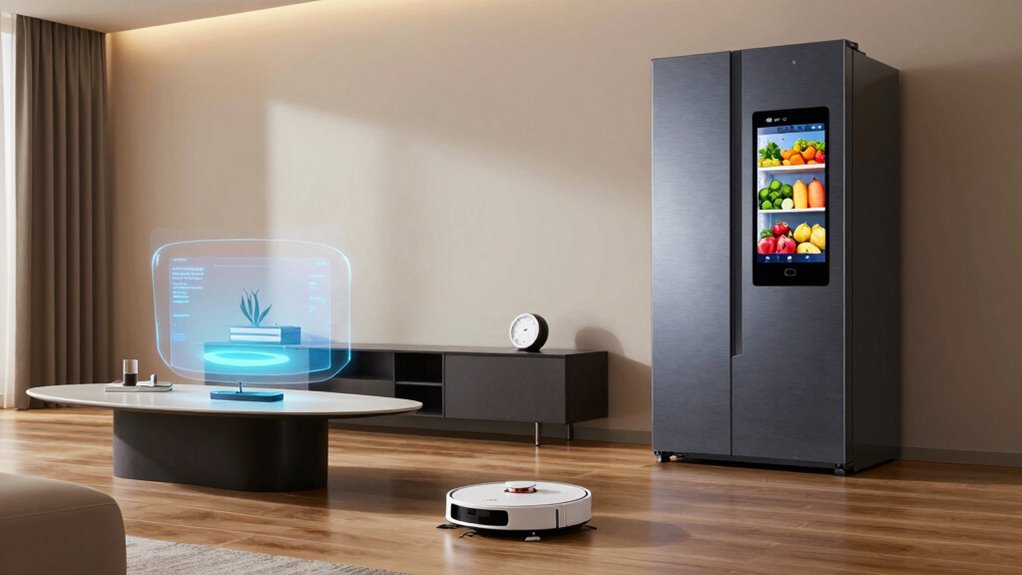

Making daily life easier with home tech depends on balancing convenience, integration, and ease of use. The Amazon Echo Show 15 stands out as the best overall for its large display and comprehensive smart features. For quick control, the GHome Smart Plug Mini offers a compact, budget-friendly way to automate devices, while the Digital Calendar 10.1-inch Wall Touch Screen helps organize family life visually. The main tradeoffs include choosing between feature-rich devices that may require setup and simpler options that deliver basic convenience. Continue reading for a full breakdown of the top picks and what makes each one unique.

Get furniture and decor delivered free — and shop member deals
- Fast, free delivery on millions of items
- Access to Prime Big Deal Days deals on October 6–7
- Prime Video, Amazon Music and more included
Complete the kit


Key Takeaways
- The best overall choices combine large displays with intuitive interfaces for managing multiple daily tasks.
- Smart plugs offer quick automation but vary significantly in compatibility and size, affecting ease of setup.
- amazon.com/dp/B0FS5LTZX7?tag=iluluonline-20&ascsubtag=dc-924938″ target=”_blank” rel=”nofollow sponsored noopener”>Digital wall calendars help with family coordination but often trade off for simplicity versus advanced features.
- Price and complexity are tightly linked; more advanced devices tend to cost more and require more setup time.
- Compatibility with voice assistants like Alexa and Google Assistant is essential for seamless integration across devices.




More Details on Our Top Picks
Amazon Echo Show 15 (Newest Model) – 15.6″ Full HD Smart Display with Fire TV and Alexa
This model stands out as the central command for home entertainment and organization, combining a large, vibrant Full HD display with a built-in Fire TV for streaming movies and shows. Unlike the smaller Echo Show 5, the 15.6-inch screen offers a more immersive experience, making it ideal for family hubs or shared spaces. Its smart home hub supports Zigbee, Matter, and Thread, simplifying device control, and privacy features like a built-in shutter and mic/camera-off button address privacy concerns. The setup can be more complex than simpler smart displays, and some features may require subscriptions, which could add costs. Overall, this pick makes the most sense for users seeking a comprehensive device that blends entertainment, communication, and smart home control in one hub.
Pros:- Large, vibrant Full HD display enhances viewing and interaction
- Built-in Fire TV offers extensive streaming options without additional devices
- Supports Zigbee, Matter, and Thread for seamless smart home integration
- Strong privacy controls including camera shutter and mic mute
Cons:- No support for ad-hoc WiFi networks, limiting flexibility
- Setup and system requirements can be complex for less tech-savvy users
- Some features may incur extra subscription costs
Best for: Families or tech-savvy users seeking a central smart home and entertainment hub with robust privacy controls.
Not ideal for: Small apartments or users preferring a simple voice assistant, as the size and complexity may be overwhelming.
- Size:16.1″ W x 10.1″ H x 1.4″ D
- Weight:4.96 lbs
- Display:15.6″ with 1920 x 1080 resolution
- Camera:13 MP with shutter
- Audio:Two 2″ woofers + two 0.6″ tweeters
- WiFi:WiFi 6E (802.1ax), Tri-band, dual-antenna MIMO
- Smart Home Hub:Zigbee, Matter, Thread
- Bluetooth:A2DP, AVRCP support
- Privacy Features:Mic/camera-off button, built-in shutter
Our verdict“This device best suits users who want a multifunctional, large-screen hub for entertainment and smart home control, willing to handle setup complexity.”
Digital Calendar 10.1 Inch Wall Touch Screen WiFi
This 10.1-inch digital wall calendar excels at consolidating family schedules, weather, and tasks into a single, easy-to-view device. Compared with the GHome Smart Calendar, it emphasizes simple wall-mounting and real-time cloud sync, making it ideal for shared spaces. Its ability to display photos and weather alongside schedules turns it into a multifunctional command center. However, setup involves wall mounting and WiFi connection, which could be a hurdle for some users. The limited information on power options suggests it may need to be plugged in, reducing placement flexibility. This pick is perfect for households wanting a dedicated, visible family organizer that also adds a bit of digital decor.
Pros:- Real-time synchronization with Google, iCloud, and Outlook keeps everyone updated
- Multifunctionality as a photo display and weather station
- Wall-mountable design for permanent placement and visibility
- Easy to read large display that enhances family coordination
Cons:- Requires wall mounting and setup, not portable
- Limited info on power options, may need to be plugged in constantly
- Some features depend on smartphone app setup
Best for: Households seeking a dedicated, wall-mounted organizational hub for schedules, weather, and family photos.
Not ideal for: Renters or users who prefer portable devices, as it requires wall mounting and fixed placement.
- Display Size:10.1 inches
- Connectivity:WiFi
- Model Year:2026
- Target Audience:Adult
- Warranty:1 Year
- ASIN:B0FS5LTZX7
Our verdict“Ideal for families wanting a permanent, wall-mounted digital organizer that combines schedules, weather, and photos in one device.”
10.1-inch Smart Digital Calendar with Touchscreen and Photo Frame
This 10.1-inch device combines an HD touchscreen with family scheduling, chores, and photo display, making it a versatile addition to home organization. Unlike the wall-mounted Digital Calendar, this model offers a portable, tabletop solution with a vibrant display suitable for quick updates and family photos. Its seamless integration with Google Calendar, Outlook, and Cozi ensures everyone stays on the same page. The touchscreen makes managing chores and schedules intuitive, but the reliance on WiFi means it won’t function fully offline. Storage capacity is modest, which could limit photo collections without extra solutions. It makes the most sense for families looking for a user-friendly, all-in-one device for daily planning and memories.
Pros:- Seamless integration with multiple calendar apps ensures consistent scheduling
- Vibrant HD IPS touchscreen for clear visuals and easy interaction
- Combines chores, meal planning, and photo display in one device
- Remote management via mobile app enhances convenience
Cons:- Requires WiFi for full functionality, limiting offline use
- Limited storage for photos unless expanded
- System updates recommended for optimal performance
Best for: Families wanting a portable, easy-to-manage device for scheduling, chores, and photo sharing at home or on the go.
Not ideal for: Users seeking a fixed, wall-mounted display, as this model is designed for portability and flexible placement.
- Display Size:10.1 inches
- Resolution:1280×800
- Memory:32GB
- Connectivity:WiFi
- Compatibility:Google Calendar, Outlook, iCloud, Cozi, Yahoo
- Features:Touchscreen, photo frame, chore chart, task management
Our verdict“Best suited for families seeking a portable, multifunctional device to manage schedules and cherish family moments easily.”
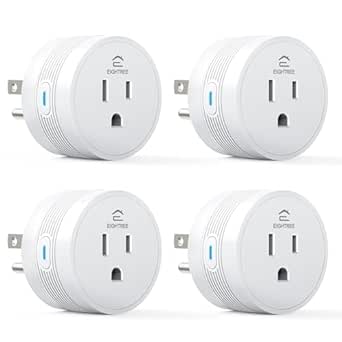
EIGHTREE Smart Plug WiFi Outlet Works with Alexa & Google Home, 15A, 4-Pack
This 4-pack of smart plugs offers an affordable way to add remote and voice control to household appliances. Compared with the GHome Mini Plug, EIGHTREE’s larger pack provides more outlets for multiple devices at once, making it suitable for whole-room automation. Its compact design allows installation in tight spaces, and scheduling and timers help reduce energy waste. However, setup requires the Smart Life app, and it only supports 2.4GHz WiFi, limiting compatibility with some networks. The lack of native Alexa or Google Home support means an extra step for voice control, which could be inconvenient for some users. This pick makes sense for budget-conscious households looking to automate multiple devices without premium features.
Pros:- Supports multiple outlets for controlling several devices simultaneously
- Easy to set up with the Smart Life app and compatible with Alexa and Google Home
- Compact design fits into tight spaces
- Offers scheduling and timers for energy efficiency
Cons:- Requires app setup, not directly via voice
- Limited to 2.4GHz WiFi, reducing compatibility with some networks
- No advanced automation features beyond scheduling
Best for: Homeowners seeking affordable, multi-outlet smart plugs to control several devices on a budget.
Not ideal for: Users with dual-band WiFi networks or seeking plug-and-play setup, as it requires app configuration and only supports 2.4GHz WiFi.
- Current Rating:15 A
- Operating Voltage:120 volts
- Wattage:1800 watts
- Control Method:remote and voice-activated
- Connectivity Protocol:Wi-Fi
- Color:White
- Number of Outlets:4
Our verdict“Great for budget-conscious users wanting to automate multiple devices with basic voice control and scheduling.”
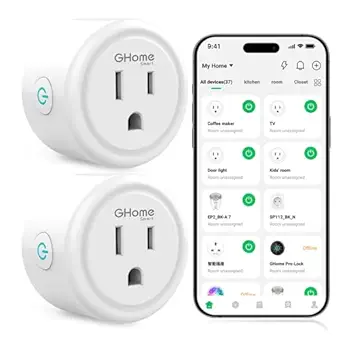
GHome Smart Plug Mini WiFi Outlet Compatible with Alexa and Google Home
The GHome Mini is perfect for users who need a discreet, space-saving smart outlet. Its compact size allows it to fit into tight spots where bulkier plugs might block other sockets, making it ideal for small lamps or appliances. It supports remote control, scheduling, and auto-off timers through the GHome app, with voice commands via Alexa and Google Home. Unlike the EIGHTREE pack, this is a single outlet, so it’s better suited for controlling specific devices rather than multiple at once. The reliance on 2.4GHz WiFi and the GHome app for setup could be a barrier for less tech-savvy users. It’s a smart choice for those prioritizing minimal footprint in their home automation setup.
Pros:- Compact size fits into tight spaces and outlets
- Supports remote control, scheduling, and auto-off timers
- Works with Alexa and Google Home for voice commands
- Certified safe with ETL and FCC
Cons:- Limited to 2.4GHz WiFi, excluding some networks
- Requires GHome app setup, which may be complex for some
- Only controls one device at a time
Best for: Individuals needing a small, unobtrusive smart plug for specific appliances or tight spaces.
Not ideal for: Users wanting multiple outlets or a plug-and-play experience with no app setup, as it’s designed for targeted control.
- Connectivity:2.4GHz WiFi
- Compatibility:Alexa, Google Home
- Power Rating:10A, 1200W, 120V
- Certifications:ETL, FCC
- Size:Compact
Our verdict“Ideal for users who need a small, safe, and effective smart outlet for specific appliances in tight spots.”
Amazon Echo Show 5 (newest model), Smart display, Designed for Alexa+, 2x bass, Clearer sound, Cloud Blue
The Echo Show 5 stands out for offering a versatile smart display in a compact size, making it ideal for kitchens, bedrooms, or small offices. Its 5.5-inch screen provides quick access to news, weather, and video calls, while the improved bass and sound clarity elevate everyday interactions. Compared with larger displays like the Echo Show 15, it’s less suited for detailed viewing or multi-tasking, but this makes it more discreet and space-efficient. Privacy features such as mic/camera off buttons and encrypted video help ease concerns about always-on devices. This model is perfect for those who want a smart hub that doesn’t dominate their space, but it isn’t ideal if detailed viewing or smart home control via multiple cameras is a priority. Pros: Compact size with bright display; Enhanced sound quality; Supports smart home control and video calls; Strong privacy controls. Cons: Small display limits detailed viewing; Limited to compatible smart home devices; Some models lack a built-in camera shutter. Verdict: This pick makes the most sense for users wanting a discreet, easy-to-use smart display that enhances daily routines without overwhelming space.**Pros:- Compact size with a bright, clear display
- Improved bass and sound clarity
- Supports smart home control and video calls
- Strong privacy features
Cons:- Small display limits detailed viewing
- Limited to compatible smart home devices
- No built-in camera shutter on some models
Best for: Individuals seeking a compact smart display for quick info, video calls, and smart home control in small spaces
Not ideal for: Users who need a large screen for detailed viewing or complex smart home setups involving multiple cameras
- Display:5.5 inches
- Camera:2 MP
- Bass:2x
- Color:Cloud Blue
- Privacy features:Mic/camera off button, built-in camera shutter, encrypted Ring video
- Materials:Recycled polyester yarn, recycled aluminum
- Packaging:Recyclable
Our verdict“Ideal for those wanting a space-efficient, voice-controlled smart display for everyday info and smart home management.”
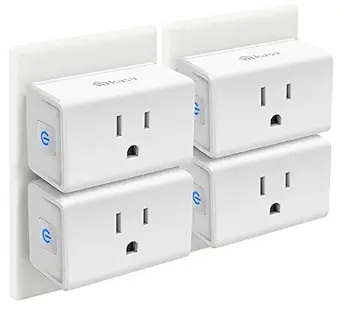
Kasa Smart Plug Ultra Mini 15A, EP10P4, Wi-Fi Outlet
The Kasa Smart Plug Ultra Mini offers a straightforward way to add remote control and scheduling to standard outlets, making it perfect for common appliances like lamps or small electronics. Its ultra-mini size ensures it fits behind furniture or in tight outlets, unlike bulkier plugs. Compared with the EIGHTREE 15A Smart Plug, the Kasa model is simpler, focusing on basic control without supporting high-power appliances, but it’s more affordable and easier to use. Its compatibility with Alexa and Google Assistant allows voice commands, which simplifies daily routines. However, it only works on 2.4GHz Wi-Fi networks, limiting compatibility with some newer routers. This plug is excellent for those who want reliable, easy automation without extra bells and whistles. Pros: Compact, space-saving design; Easy setup and use; Supports voice control; Reliable Wi-Fi connection. Cons: Limited to 15A load; Only works on 2.4GHz Wi-Fi; Lacks advanced features like energy monitoring. Verdict: Best suited for users needing simple, reliable control of everyday devices in small outlets.**Pros:- Compact size fits in tight spaces
- Easy setup with smartphone app
- Supports voice commands with Alexa and Google Assistant
- Reliable Wi-Fi connectivity
Cons:- Limited to 15A maximum load
- Requires 2.4GHz Wi-Fi network
- Lacks energy monitoring or advanced scheduling features
Best for: Homeowners seeking affordable, easy-to-integrate Wi-Fi outlets for basic device control
Not ideal for: People wanting to control high-power appliances or requiring 5GHz Wi-Fi support
- Model:EP10P4
- Maximum Current:15A
- Connectivity:Wi-Fi 2.4GHz
- Certification:UL certified
- Warranty:2 years
Our verdict“Perfect for those needing simple, remote control over everyday devices without extra complexity.”
EIGHTREE 15A Smart Plug 4 Pack, Works with Alexa & Google Home
The EIGHTREE 15A Smart Plug 4 Pack is designed for heavier appliances like heaters, coffee makers, or air fryers, supporting up to 1800W. Its four outlets enable simultaneous control of multiple high-power devices, making it more versatile than single-outlet options like the Kasa Ultra Mini. The plug’s compact design allows it to fit behind furniture, and its no-hub-needed Wi-Fi connection eases installation. Compared with the GHome WiFi Smart Plug, it provides more outlets for managing multiple appliances at once, but it lacks features like energy monitoring or advanced scheduling. Compatibility with Alexa, Google, and SmartThings broadens its use cases, especially when managing larger or multiple devices. Pros: Supports high-power appliances; Easy setup; Multiple outlets for simultaneous control; Compatible with popular voice assistants. Cons: Limited to 2.4GHz Wi-Fi; No energy monitoring features; Not suitable for low-power or sensitive electronics. Verdict: Ideal for households needing to control several high-wattage appliances remotely and easily.**Pros:- Supports high-power appliances up to 1800W
- Four outlets for simultaneous control
- Easy setup without hub
- Compatible with Alexa, Google, and SmartThings
Cons:- Limited to 2.4GHz Wi-Fi
- No energy monitoring or advanced scheduling
- Not suitable for sensitive electronics
Best for: Families managing multiple heavy appliances that benefit from remote, scheduled control
Not ideal for: Users with small electronics or those needing energy monitoring features
- Power Rating:15A/1800W
- Connectivity:Wi-Fi, FCC, ETL
- Number of Outlets:4
- Compatibility:Alexa, Google Home, SmartThings
- Certification:FCC, ETL
Our verdict“Best for users who need to manage multiple high-wattage devices remotely with minimal fuss.”
GHome WiFi Smart Plug with Alexa and Google Assistant Compatibility
The GHome WiFi Smart Plug offers a straightforward way to control devices such as lamps or small appliances via app or voice, making it suitable for everyday convenience. Its 10A rating limits its use with high-power devices, but it’s simple to set up and provides reliable operation thanks to stable Wi-Fi. The plug’s compatibility with Alexa and Google Assistant allows voice commands, but it requires initial app setup, which can be a barrier for less tech-savvy users. It only supports 2.4GHz Wi-Fi, like many others, which might restrict compatibility with some newer routers. Compared with the Kasa Ultra Mini, it offers similar basic functionality but with a slightly different aesthetic and setup process. Best for those who want a dependable, no-fuss plug for smaller devices. Pros: Easy voice control setup; Reliable remote control via app; Supports Alexa and Google Assistant; Stable Wi-Fi connection. Cons: Limited to 10A; Only works on 2.4GHz Wi-Fi; Needs app setup before linking with voice assistants. Verdict: Suitable for users seeking a simple, dependable smart plug for small appliances.**Pros:- Supports Alexa and Google Assistant
- Remote control and scheduling via app
- Stable Wi-Fi connection
- Easy setup process
Cons:- Limited to 10A maximum
- Only supports 2.4GHz Wi-Fi
- No energy monitoring or advanced scheduling
Best for: Homeowners desiring a straightforward, dependable plug for controlling small devices via voice and app
Not ideal for: Those needing to manage high-power appliances or requiring energy monitoring features
- Operation Mode:ON-OFF-ON
- Current Rating:10 A
- Operating Voltage:120 volts
- Contact Type:Normally Open
- Control Method:App, Remote, Touch, Voice
- Connectivity Protocol:Wi-Fi
- Wattage:1200 watts
- Color:White
Our verdict“Best for simple, reliable control of small devices with voice command support.”
The Tech-Wise Family: Everyday Steps for Putting Technology in Its Proper Place
This book offers practical advice for families aiming to establish healthy boundaries with technology, promoting a balanced digital lifestyle. Unlike device-focused reviews, it provides actionable steps that help parents and caregivers create a mindful home environment. Compared with tech products like smart plugs or displays, this guide emphasizes behavioral changes over gadgets, making it ideal for families wanting a comprehensive approach. While it lacks technical specs or device features, its strength lies in fostering healthier tech habits, which can enhance the overall home tech experience. However, those seeking quick fixes or specific product recommendations might find it less immediately useful. Pros: Practical strategies for managing device use; Encourages healthy digital habits; Suitable for families seeking balance; Focuses on behavioral change. Cons: Lacks detailed product insights; Not a quick technical fix; May require ongoing commitment. Verdict: An essential read for families wanting to cultivate a healthier relationship with technology, complementing device purchases.**Pros:- Provides practical, actionable advice
- Fosters healthy tech habits
- Suitable for families seeking balance
- Encourages mindful digital use
Cons:- Lacks detailed product specifications
- Requires ongoing effort to implement
- Not a quick-fix solution
Best for: Parents and families seeking guidance on integrating technology healthily into daily life
Not ideal for: Individuals looking for technical product reviews or quick solutions without behavioral change strategies
Our verdict“Best for families aiming to develop healthy, balanced technology habits alongside smart device use.”
Digital Calendar 10.1″ Touchscreen, Smart Wall Organizer, Chore & Meal Manager, Photo Frame
This digital calendar stands out for its comprehensive approach to family organization, combining a large, easy-to-read touchscreen with multiple syncing options like Google Calendar, iCloud, and Outlook, similar to the Digital Calendar 10.1 Inch Wall Touch Screen WiFi. Its ability to integrate chores, meal planning, weather updates, and photo slideshows makes it a versatile hub for daily life. Compared with simpler models, this device offers a richer feature set, though its interface can feel complex initially, and it’s limited to a 10.1-inch display—meaning larger or more visual needs might require a bigger screen. Its Wi-Fi dependency and learning curve are tradeoffs for its all-in-one convenience.
Pros:- Syncs with multiple calendar services without subscription fees
- Includes interactive chore and meal planning features
- Functions as a digital photo frame and weather display
- Wall-mountable and easy to install
Cons:- Limited to a 10.1-inch display size, which may be small for some users
- Requires Wi-Fi for syncing and updates, so not ideal for offline use
- Interface could be complex for tech beginners
Best for: Families seeking a centralized digital hub that simplifies scheduling, chores, and photo sharing without ongoing subscription costs.
Not ideal for: Users looking for a larger display or a simple, plug-and-play calendar—this device requires Wi-Fi and some setup effort.
- Brand:Oqsonwu
- Model Number:S101
- Item Weight:1.4 pounds
- Warranty:1 Year
- ASIN:B0GQFG9VGT
Our verdict“This pick is ideal for families who want a versatile, all-in-one digital organizer that keeps everyone connected and organized, despite some initial setup complexity.”
How We Picked
Products were selected based on their ability to make daily routines more convenient through automation, organization, and control. We prioritized devices with user-friendly interfaces, reliable connectivity, and broad compatibility with popular smart home ecosystems. Build quality, ease of installation, and value for price were also key factors. Our ranking reflects a balance between feature set, ease of use, and how well each product fits into a typical family or individual lifestyle, ensuring the options are practical for most buyers.Factors to Consider When Choosing Home Tech Daily Life Easier
When choosing home tech to simplify daily life, consider how each device integrates into your existing routines and ecosystem. Think about ease of setup and use, as complicated systems can become more of a hassle than a help. Compatibility with voice assistants is crucial for hands-free control, especially if you already use Alexa or Google Home. Budget also plays a role: investing in versatile, durable devices can save money in the long run, but cheaper options may deliver quick wins for smaller routines. Lastly, think about the specific functions you need—whether it’s organization, automation, or entertainment—and match these needs with the right device features.Ease of Setup and Use
The primary consideration should be how straightforward it is to install and operate the device. Devices with intuitive apps, clear instructions, and minimal wiring tend to be more successful in daily use. Overly complex systems can lead to frustration and abandonment, so look for options with good user reviews on setup experience. If you’re less tech-savvy, prioritizing plug-and-play solutions or devices with strong customer support can make a big difference. Remember, the easiest devices often provide quicker benefits and less ongoing maintenance.
Compatibility and Ecosystem Integration
Matching your devices to your existing smart home ecosystem ensures smooth operation. If you already have an Alexa or Google Assistant setup, choose devices that seamlessly integrate with those platforms. Compatibility extends beyond voice control—look for products that work with your preferred routines, hubs, or apps. Avoid devices that require multiple apps or complicated linking processes, which can create frustration and reduce overall convenience. Well-integrated devices deliver a unified experience, saving time and effort in managing your smart home.
Functionality vs. Simplicity
More features often mean higher costs and complexity. Decide whether you need multifunctional devices, like displays that handle calendars, entertainment, and voice commands, or if simple automation suffices. Overloading with features can lead to steep learning curves, while simpler devices may require more manual input. Consider your daily routines—if you want to streamline multiple tasks from a single device, investing in a more capable product might pay off. Conversely, if your goal is quick, straightforward automation, simpler solutions will do just fine.
Budget and Long-Term Value
While it’s tempting to go for the cheapest options, investing a bit more upfront can result in better durability, compatibility, and functionality. Cheaper devices often lack advanced features or robust support, leading to potential replacements sooner. Assess the long-term value based on device lifespan, energy savings, and how much time they save you each day. Sometimes, paying more for a well-supported, versatile product means fewer headaches and more consistent daily benefits.
Design and Space Considerations
The physical size and aesthetic of devices matter, especially in shared spaces. Large displays like the Echo Show 15 can dominate a room, while compact plugs or calendars fit discreetly into your environment. Think about where each device will go—if space is limited, opt for small, unobtrusive options. Also, consider design consistency across your tech—matching styles can make your home look less cluttered and more cohesive, enhancing daily use without visual disruption.
Frequently Asked Questions
Can these smart devices work together seamlessly?
Most devices in this roundup are designed to work within common ecosystems like Amazon Alexa or Google Home, making integration straightforward. Compatibility depends on the specific device and your existing setup, but many products now support multiple platforms, reducing the chance of incompatibility issues. To ensure seamless operation, verify compatibility before purchasing and consider sticking to one ecosystem if you want a smooth user experience. A well-integrated system minimizes the need for manual control and makes daily routines more fluid.
Are digital wall calendars reliable for family coordination?
Digital wall calendars can significantly improve family organization when they work reliably and are easy to update. Devices with touchscreen interfaces and clear displays tend to be more user-friendly, especially for quick edits or viewing. However, they depend on stable Wi-Fi connections and proper setup. Some models may lack advanced features like integration with mobile calendars, which can limit flexibility. Overall, they are effective tools if chosen with ease of use and reliability in mind, but they’re less suitable if your family prefers digital apps on phones or tablets.
Is investing in a smart display worth it for daily routines?
Smart displays like the Echo Show 15 or Echo Show 5 can centralize family routines, control smart devices, and provide quick access to information. They are especially useful if you want a visual interface for calendars, weather, or video calls. However, they come at a higher price point and require space and setup time. If you frequently use voice commands or want a dedicated control hub, they can be a valuable addition. For simpler needs, a smart plug or basic calendar might be more practical and cost-effective.
How do I choose the right smart plug for my needs?
Choosing the right smart plug depends on your existing smart ecosystem, power needs, and space constraints. Look for models that are compatible with your voice assistant and support the wattage of your devices. Compact designs are better for crowded outlets, while those with energy monitoring can help track power usage. Consider whether you want a single outlet or a multi-pack for broader automation. Selecting a reliable, easy-to-use smart plug ensures quick setup and consistent operation, making daily routines smoother.
What are common pitfalls when adding home tech for daily life?
One common mistake is overloading your system with incompatible devices, leading to frustration and unreliable performance. Another is choosing overly complex products that require extensive setup or technical knowledge, which might outweigh their benefits. Failing to consider integration can result in isolated devices that don’t communicate well. Also, neglecting to verify Wi-Fi strength and coverage can cause connectivity issues. To avoid these pitfalls, focus on compatible, user-friendly devices that suit your routine, and plan your setup to ensure reliable operation.
Conclusion
For those seeking an all-in-one solution to streamline daily routines, the Amazon Echo Show 15 offers the best blend of display, voice control, and smart home integration, making it ideal for busy households. Budget-conscious users or those just starting out will find the GHome Smart Plug Mini and simple digital calendars excellent for quick wins. Tech enthusiasts aiming for premium features should consider advanced smart displays or multi-device setups, while families focused on organization benefit from dedicated digital wall calendars. Ultimately, selecting the right product depends on your specific needs, space, and how much you want to automate or organize your home daily life in 2026.
As an affiliate, we earn on qualifying purchases.Evergreen bestsellers Picks
bestsellers